
TechUtsav 1.0 2026 · Official Rulebook
IDC Club presents
404: Escape the Room
IDC | TechFest Developer Event
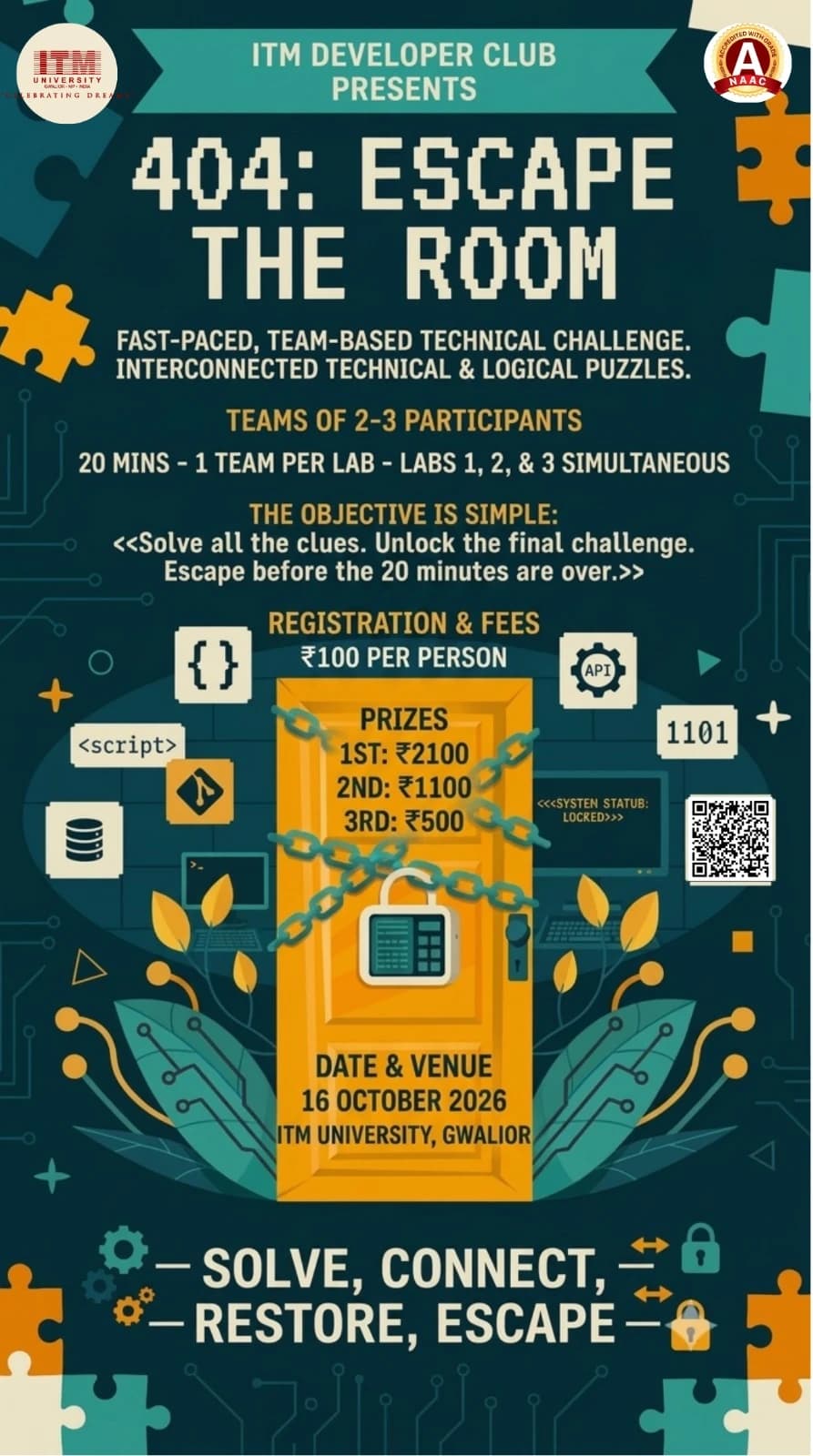
3 Labs. 3 Teams at a time. 20 Minutes. 1 Winner.
- Date
- Friday, October 16, 2026
- Time
- 10:00 AM – 12:00 PM
- Venue
- MGFF Lab 1 & Lab 2, ITM University, Gwalior
- Participation
- Team · 2–3 members
- Registration fee
- ₹100 per person
Rules & Regulations
1. Event Overview
404: Escape the Room is a fast-paced, team-based technical escape-room challenge. Teams will enter one of three designated labs, where they will have 20 minutes to solve a series of interconnected technical and logical challenges.
Each lab will function as a complete, self-contained escape room. All clues, puzzles, computers, and required resources for a team's challenge will be contained within its assigned lab.
Three teams can participate simultaneously, with one team assigned to each lab.
The objective is simple:
Solve all the clues. Unlock the final challenge. Escape before the 20 minutes are over.
The team with the lowest successful completion time, after any applicable penalties, will be declared the winner.
2. Team Formation
- Each team will consist of 2–3 participants.
- Teams of fewer than 2 participants will not be permitted.
- Participants from different academic years may form a team.
- Mixed-year teams are allowed.
- Each team will receive a unique Team ID.
- Team members must remain together inside their assigned lab.
- Team members cannot be replaced once their attempt begins.
3. Lab Structure
The event will use three labs:
- Lab 1
- Lab 2
- Lab 3
Each lab will contain a complete set of challenges.
Only one team will be present in each lab during a particular 20-minute slot.
Therefore, up to three teams can participate simultaneously.
Example
| Slot | Lab 1 | Lab 2 | Lab 3 |
|---|---|---|---|
| Slot 1 | Team 1 | Team 2 | Team 3 |
| Slot 2 | Team 4 | Team 5 | Team 6 |
| Slot 3 | Team 7 | Team 8 | Team 9 |
Teams will be assigned a lab and slot by the organisers.
4. Self-Contained Challenges
Every lab will contain its own complete set of clues.
A team will not need to leave its assigned lab at any point during the challenge.
For example, a team may start with:
Clue 1
↓
Web Puzzle
↓
Hidden Code
↓
Programming Puzzle
↓
Physical Clue
↓
Final Lock
All of these will be located inside the same lab.
The three labs may have different puzzles and different clue arrangements, but they will be designed to have a comparable overall difficulty.
5. Challenge Design
The event will combine technical and non-technical puzzle elements.
Challenges may include:
- HTML inspection
- JavaScript
- Programming logic
- SQL
- Git
- APIs
- Binary/hexadecimal decoding
- QR codes
- Pattern recognition
- Computer fundamentals
- Debugging
- Hidden messages
- Physical clues
- Logical puzzles
Not every challenge will require programming.
The intention is to allow every team member to contribute.
For example, one participant may notice a hidden clue, another may solve a programming problem, while another works on decoding information.
6. Challenge Flow
The puzzles will be connected rather than being a list of independent questions.
Solving one challenge should provide information required to reach the next stage.
For example:
A webpage contains hidden HTML information.
The team discovers:
"ACCESS CODE: 7391"
Entering "7391" into another terminal unlocks the next clue.
The next clue may contain a JavaScript problem.
Its output may reveal:
"LOOK UNDER TERMINAL 02"
The team then finds the next physical clue.
This continues until the team reaches the final challenge.
7. Difficulty and Participants
The event is intended to be accessible to students from different years.
The challenges can contain a mixture of:
Basic
- Simple decoding
- HTML inspection
- Basic programming logic
- Pattern recognition
- Computer fundamentals
Intermediate
- JavaScript
- SQL
- Debugging
- Git
- API-related puzzles
Advanced
- Multi-step technical reasoning
- Complex debugging
- Database relationships
- Combining information from multiple clues
- More complicated programming logic
The event does not require separate categories for different academic years.
A team can use the different strengths of its members to solve the complete challenge.
8. Starting the Attempt
Before entering the lab, the team will receive a short briefing covering:
- Rules
- Safety instructions
- Time limit
- Hint system
- Allowed resources
The team will then enter its assigned lab.
The lab may initially display a system such as:
404: ESCAPE THE ROOM
SYSTEM STATUS: LOCKED
USER ACCESS: DENIED
Once the organisers give the start signal, the system changes to:
ESCAPE PROTOCOL ACTIVATED
TIME REMAINING: 20:00
The timer begins.
9. Time Limit
Each team receives exactly:
20 MINUTES
The timer begins when the official start signal is given.
The timer continues regardless of whether the team is:
- Solving a puzzle
- Searching for a clue
- Debugging
- Moving around the lab
- Waiting for a team member
- Using a hint
There will be no additional time for ordinary delays.
10. Final Escape
The final challenge will require the team to use the information gathered during the earlier stages.
Once the team reaches the correct final answer, the organiser will verify the solution and stop the timer.
The system may display:
SYSTEM ACCESS RESTORED
ESCAPE SUCCESSFUL
TIME RECORDED: 14:37
The team's completion time will then be recorded.
11. Time Expiry
When the 20-minute timer reaches zero:
00:00
ESCAPE PROTOCOL TERMINATED
SYSTEM REMAINS LOCKED
The attempt ends immediately.
A team that has not completed the final challenge within 20 minutes will be marked as TIME EXPIRED.
12. Hints
Teams may request hints if they are unable to progress.
Hints will carry a time penalty.
Recommended system:
- First hint: +1 minute
- Second hint: +2 minutes
- Third hint: +3 minutes
The exact penalty will be announced before the event.
The hint penalty will be added to the team's final completion time.
Example
| Team completes the challenge in | They used two hints | Final time |
|---|---|---|
| 15:20 | +3:00 penalty | 18:20 |
Teams therefore have to decide whether solving a puzzle themselves is worth the additional time.
13. Ranking
Teams that successfully escape will be ranked according to their final adjusted completion time.
Final Time
Actual completion time + applicable penalties
For example:
| Team | Completion | Penalty | Final Time |
|---|---|---|---|
| Team A | 14:32 | +2:00 | 16:32 |
| Team B | 15:10 | +0:00 | 15:10 |
| Team C | 13:45 | +3:00 | 16:45 |
Therefore, Team B ranks first.
The team with the lowest final time wins.
14. Tie-Breaker
If two teams have exactly the same final time, the organisers may use a short tie-breaker challenge.
The tie-breaker may involve:
- A programming problem
- A logical puzzle
- A debugging challenge
- A technical question
The organisers' decision regarding the tie-breaker will be final.
15. Allowed Resources
The organisers will clearly announce which resources are permitted before the event.
Depending on the challenge, participants may be allowed to use:
- Computers provided in the lab
- Internet access
- Mobile phones
- Programming environments
- Search engines
- Specific websites or tools
The use of AI tools, external assistance, or other resources will be governed by the rules announced for the event.
Participants may not contact people outside the event for assistance.
If a resource is not explicitly permitted, participants should consider it not allowed.
16. Mobile Phones
Mobile phones may be permitted for specific purposes such as:
- Scanning QR codes
- Accessing clues
- Viewing web-based challenges
- Using event-provided resources
They must not be used to:
- Contact people outside the team for solutions
- Search for leaked solutions
- Communicate with other participating teams
- Record or distribute challenge material
The organisers may require phones to be kept aside if a particular challenge does not permit their use.
17. Team Collaboration
Team members may freely discuss and solve the challenges together.
However:
- Teams may not communicate with other teams during their attempts.
- Teams may not share answers or clues.
- Teams may not receive assistance from teams that have already completed the challenge.
- Teams may not communicate challenge information to teams waiting for their turn.
Since different teams may be placed in different labs at the same time, participants must not intentionally reveal information about their lab's challenges.
18. Handling Clues and Equipment
Participants must not:
- Destroy clues.
- Hide clues from other teams.
- Remove clues from their designated locations unless instructed.
- Tamper with computers or network equipment.
- Open restricted equipment.
- Access files or systems unrelated to the challenge.
- Modify the physical setup of the lab unnecessarily.
If a clue is designed to be moved, the instructions will make this clear.
19. Safety
Participant safety takes priority over competition.
Participants must:
- Walk inside the laboratory.
- Avoid climbing on furniture.
- Avoid touching electrical equipment.
- Keep emergency exits clear.
- Follow organiser instructions.
- Report damaged equipment immediately.
No challenge will require participants to perform an unsafe action.
20. Disqualification
A team may be disqualified for:
- Cheating.
- Receiving outside assistance.
- Sharing answers with another team.
- Deliberately interfering with another team.
- Accessing restricted areas or systems.
- Damaging or deliberately tampering with equipment.
- Destroying or intentionally altering clues.
- Using unauthorised resources.
- Attempting to bypass the intended challenge through unauthorised methods.
- Any behaviour that compromises event safety or fairness.
The organisers' decision regarding disqualification will be final.
21. Technical Problems
If a technical problem occurs that is caused by the event setup, such as:
- Computer failure
- Network failure
- Broken webpage
- Malfunctioning clue
- Incorrect challenge configuration
the team should immediately notify the organiser.
The organiser may:
- Pause the timer.
- Repair or replace the affected component.
- Restore the team's progress.
- Provide an equivalent replacement challenge.
Technical problems caused by the event organisers will not unfairly count against the team.
22. Lab Reset
Because three teams can participate simultaneously, each lab will be reset after every 20-minute attempt.
The reset will include:
- Replacing physical clues.
- Resetting computers.
- Resetting digital puzzles.
- Clearing previous answers.
- Restoring locks or mechanisms.
- Checking all challenge components.
Teams must not remain inside the lab after their attempt has ended.
They must not communicate the solutions to teams waiting for later slots.
23. Event Slot Structure
The event will operate in 20-minute slots.
Each slot can accommodate three teams.
Example
| Slot | Lab 1 | Lab 2 | Lab 3 |
|---|---|---|---|
| Slot 1 — 10:00–10:20 | Team 1 | Team 2 | Team 3 |
| Slot 2 — 10:25–10:45 | Team 4 | Team 5 | Team 6 |
A short gap may be maintained between slots to allow organisers to reset the labs and prepare the next teams.
The exact schedule will be provided by the organisers.
24. Lab Balance
Since the three labs may contain different puzzles, all three challenge sets will be designed to have comparable difficulty and expected completion time.
The organisers will test the challenges before the event to identify major differences in difficulty.
If a technical issue or major imbalance affects a particular lab, the organisers may make appropriate adjustments to ensure fair competition.
25. Winning Condition
The winning team is the team that:
- Completes all required challenges.
- Successfully reaches the final solution.
- Does so within the 20-minute limit.
- Has the lowest final adjusted time.
The event therefore rewards:
Speed + Logic + Technical Knowledge + Observation + Teamwork
rather than simply coding ability.
26. Event Presentation
The event should feel like a live technical emergency rather than a collection of classroom puzzles.
Each lab can have a simple mission-control theme.
Before the attempt:
SYSTEM STATUS: LOCKED
ACCESS: DENIED
ESCAPE PROTOCOL: OFFLINE
At the start:
⚠ SYSTEM BREACH DETECTED
ESCAPE PROTOCOL ACTIVATED
20:00
During the challenge, screens can display:
15:42 REMAINING
or:
NEW DATA DETECTED
or:
ACCESS LEVEL 02 UNLOCKED
At the end:
Successful team
SYSTEM RESTORED
ESCAPE SUCCESSFUL
TIME: 14:27
Time expired
TIME EXPIRED
SYSTEM REMAINS LOCKED
This gives all three labs the same overall identity while allowing each one to have completely different puzzles.
27. Core Event Concept
You have 20 minutes. The system is locked. The clues are hidden around the lab. Find them. Connect them. Solve them. Restore the system before time runs out.
3 Labs. 3 Teams at a time. 20 Minutes. 1 Winner.